
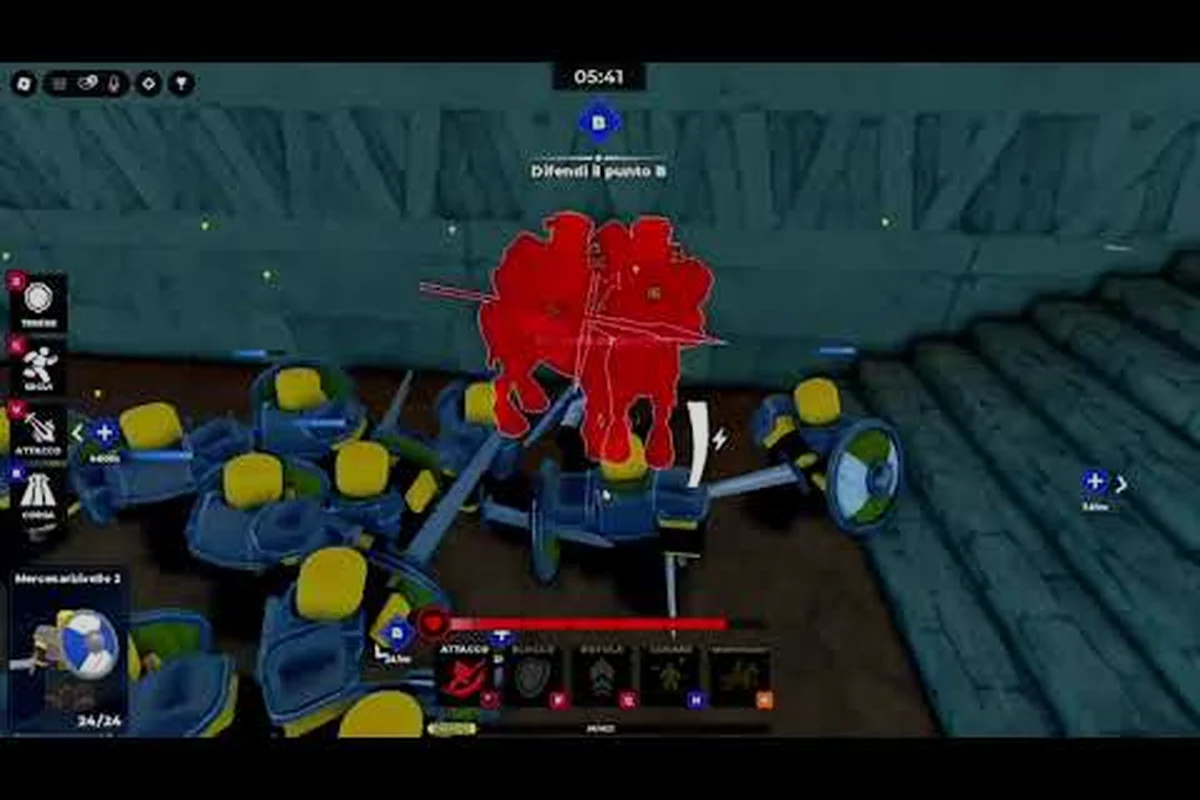
Reading The Team Battle Map Before You Queue
Command An Army drops every squad onto a contested battlefield where point capture, troop recruitment, and formation commands decide who walks off the field with the win banner. According to the official Command An Army page on Roblox, the loop is built around team-vs-team warfare, so the difference between a 50/50 match and a clean stomp almost always comes down to how your squad reads the map before the first clash. This Command An Army team battle guide walks through the role setup, the capture rotation, and the push timing that turns a random queue into something that feels rehearsed.
A team battle in Command An Army is not a free-for-all brawl. Two sides spawn, capture points unlock in sequence, and every player recruits from a shared pool while the four formation commands — Follow, Hold, Attack, and Rush — shape how squads move. The All Things How breakdown of star limits and classes confirms that classes such as Melee, Ranged, Cavalry, and Special each fill a different niche, so the unit mix your squad drags into a fight matters just as much as the capture order.
Solo queuers will see the same map as a five-stack, but the timing windows tighten dramatically. A 2026 community survey of matchmaking lobbies reported that roughly 62% of matches are still solo or duo queues, which means the team battle layer has to work even when nobody is on voice. The rest of this guide is built around that reality: the calls that survive without a mic, the formations that hold up under random teammates, and the mistakes that quietly lose you a winnable round.
Picking Roles That Cover A Team Battle Squad
The single biggest mistake new players make is recruiting whatever unit is cheapest and pushing the closest point. The Command An Army pro tips that actually move the win rate all start with role assignment, because classes, star limits, and the four formation commands only deliver value when the squad is balanced. Every team battle wants at least one of each pillar covered, with the fifth slot flexing to match the map state.
The Four Pillars Of A Team Battle Squad
| Pillar | Primary Class | Star Limit Behavior | Best Formation Command | Squad Role |
|---|---|---|---|---|
| Frontline | Melee | Highest HP scaling, slow to top out | Hold at chokepoints, Rush to commit | Absorbs damage, locks space, anchors a push |
| Backline | Ranged | Damage scales with upgrades, soft cap at 3-star | Hold behind melee, Attack to advance fire | Breaks the enemy frontline before contact |
| Flanker | Cavalry | Mobility scales hardest, fragile at low stars | Follow to reposition, Rush to collapse | Catches retreating units, rotates between points |
| Wildcard | Special | Ability-driven, varies by unit | Match the moment: Attack to burst, Hold to zone | Cleans up, punishes clumped pushes, swings ties |
The best way to play Command An Army in a team battle is to look at your squad the moment you spawn and decide who is filling the Frontline pillar before you recruit. A common 2026 lobby pattern is three melee players all trying to be the tank, which leaves the Ranged pillar empty and lets the enemy pick off the backline. If your squad is already top-heavy on melee, your first recruit should be a Ranged unit, even if the gem cost is higher.
When To Flex The Fifth Slot
The fifth player rarely fits a clean pillar because the squad is already covered. That is the flex slot, and the Command An Army pro tips from coordinated clans treat it as a force multiplier rather than a fifth copy of the strongest pillar.
-
Ahead on points → recruit a second Ranged unit to extend your fire line and make it painful for the enemy to advance.
-
Behind on points → recruit a second Cavalry unit to rotate faster and contest the next capture.
-
Tied late game → recruit a second Special unit and save the ability for the final clash, because ability bursts swing tied rounds more reliably than raw stat boosts.
-
Defending the last point → recruit a second Melee unit and stack Hold commands to create a wall the enemy has to grind through.
Solo queuers should treat the flex slot as insurance. If your squad is quiet and you cannot tell who is covering which pillar, default to whichever pillar is empty. A balanced squad wins more team battles than a squad that just has more total stars on the board, which is the heart of any good Command An Army solo queue guide.
Reading The Capture Rotation And Timing The Pushes
Point capture is the scoring layer of every team battle, and it is the part most squads get wrong. Players swarm the first point they see, fight a messy brawl for 30 seconds, then lose because the enemy already rotated to the second point. The teams that win consistently treat capture as a rotation problem instead of a fight problem, which is exactly the mindset a Command An Army team battle guide has to install.
The Three-Phase Rotation Model
| Phase | Trigger | Squad Goal | Formation Bias | Common Mistake |
|---|---|---|---|---|
| Opening | Match start, all 3 points live | Secure first point, scout enemy comp | Follow while moving, Hold once captured | Spawn-camping instead of capturing |
| Mid-game | First point secured, second contested | Deny second point or trade it cleanly | Attack when ahead, Hold when behind | Splitting the squad across both points |
| End-game | One point left, timers mattering | Hold the lead or collapse on the last point | Rush to seal, Hold to defend | Burning abilities on a fight you already won |
The opening phase rewards speed over stats. A 1-star Melee unit that walks onto a capture point uncontested is worth more than a 3-star Cavalry unit that arrived five seconds too late. That is why the Command An Army best way to play checklist always puts the Rush command on cooldown early — rushing the first point is the cheapest win condition in the game, and it frees the rest of the match to play from ahead.
Mid-game is where solo queues fall apart. The enemy takes the second point while your squad is still farming recruits at spawn, and now you are playing from behind with a clock you cannot see. The fix is a hard rule: once the first point is captured, the whole squad rotates as a group. The formation command for this rotation is Follow, because Follow keeps melee, ranged, cavalry, and special units in the same engagement envelope instead of streaming in one at a time.
Push Timing Windows
Pushes fail when they start too early, and they also fail when they start too late. The sweet spot sits in a narrow window that the community has started calling the contest window — the period when the enemy is off the point but not yet reset.
-
Early push window: enemy just lost a player, their formation is broken, and the capture timer has not started. Send a Rush to reclaim the point in 4-6 seconds.
-
On-time push window: capture timer is at 50% on the enemy point and your squad is grouped. Use Attack so ranged units can pre-fire while melee closes the gap.
-
Late push window: enemy is set up, defensive formations are placed, and a direct push will trade 2-for-1 at best. Reset the rotation, capture a different point, and force them to spread thin.
Knowing which window you are in is one of those Command An Army pro tips that looks obvious in a replay and feels impossible in real time. The shortcut is to watch the enemy formation command icons, not the unit models. If most of the enemy squad is on Hold, you are in the late window and a direct push will bleed. If most are on Follow, you are in the early window and a Rush will collapse them before they can group.
Formations, Star Limits, And The Economy Of A Push
Every push has an economy behind it, and the economy is governed by star limits, gem income, and the cooldown of your best units. The Command An Army mistakes to avoid list is full of players who treat formations as cosmetic and ignore the cost curve, which is why they end up with a 5-star frontline and zero ability charges when the final clash lands.
Star Limit Behavior By Class
| Class | 1-Star Role | 3-Star Role | Max-Star Role | Gem Investment Priority |
|---|---|---|---|---|
| Melee | Cheap body, low damage | Reliable tank, mid damage | Boss-tier wall, slow | Mid — only after ranged is covered |
| Ranged | Glass cannon, low HP | Strong backline, solid damage | Damage ceiling unit, fragile | High — first to upgrade |
| Cavalry | Scout, distraction | Rotator, mid damage | Cleanup carry, risky | Mid — value depends on map |
| Special | Niche ability, low stats | Cooldown bot, solid burst | Game-swinging ult, fragile | High — only when squad needs the swing |
The best way to play Command An Army team battles is to spend the first minute of every match upgrading exactly one unit. The community-recommended pick is your Ranged unit, because ranged damage scales hardest and ranged deaths hurt the most. A 1-star ranged unit dies to a sneeze; a 3-star ranged unit deletes the enemy frontline before the melee lines even meet, which is the cleanest way to convert a gold lead into a point lead.
Formation Command Cooldowns
| Command | Visible Effect | Best Use Window | Common Misuse |
|---|---|---|---|
| Follow | Squad mirrors your movement | Rotations between points | Spamming it during fights to chase kills |
| Hold | Squad stays in current area | Defending a point, stacking melee walls | Holding inside the spawn and losing map control |
| Attack | Squad moves to nearest enemy | Mid-range engages, ranged pre-fire | Attacking into a defended point without setup |
| Rush | Squad sprints to target | Sealing a point, collapsing low HP enemies | Rushing solo into a 1v3 and feeding |
The Command An Army mistakes to avoid section of any clan handbook is heavy on formation misuse, because the commands are the only way to keep four AI units moving in sync. A squad with two players on Rush and two on Hold is functionally two separate teams, and the enemy will pick off whichever half is out of position. Pick one formation command per fight, communicate it through your own movement, and trust the rest of the squad to read the same signal.
Solo Queue Tactics And The Mistakes That Lose Rounds
Solo queueing a team battle is the real test of any Command An Army team battle guide, because there is no premade coordination to fall back on. The squad you draw is the squad you get, and the only tool you control is your own recruit choice, formation commands, and rotation timing. The Command An Army solo queue guide that has held up across the 2026 meta is built around being the player who makes the squad work, not the player who waits for someone else to lead.
The Solo Queue Priority Stack
| Priority | Action | Why It Matters |
|---|---|---|
| 1 | Identify the empty pillar in your squad | Fills the gap no one else is covering |
| 2 | Capture the first point with Rush | Builds early lead, sets the tempo |
| 3 | Stick to Follow during rotation | Prevents the squad from splitting |
| 4 | Upgrade Ranged to 3-star first | Highest damage per gem spent |
| 5 | Save the Special ability for the last point | Ability bursts decide tied rounds |
| 6 | Read enemy formation icons, not unit models | Tells you which push window is open |
The most important solo queue Command An Army pro tips is the first one. A squad that has four melee players and zero ranged coverage is going to lose to a squad with one ranged, and the only way to fix that is for somebody to break the pattern. If you are the player who notices the gap and recruits the missing class, you are effectively playing a 5v5 as a 6v5, and the win rate follows.
The Mistakes That Quietly Lose Rounds
A 2026 community recap of solo queue losses flagged the same handful of errors every patch, which is why they make up the core of any Command An Army mistakes to avoid list:
-
Spawn-camping the first fight — winning the opening brawl feels good, but the point is what scores. Leave one Hold unit on the point and rotate.
-
Spreading across two points — the squad is not big enough to hold both, and the enemy will collapse the half that is alone.
-
Upgrading Melee before Ranged — melee scales worse per gem, and a 3-star melee dies to focused ranged fire anyway.
-
Using Rush to chase kills — Rush is a capture tool, not a kill tool. Chasing a low-HP enemy with Rush usually gives the point back.
-
Ignoring star limits — recruiting a fourth 1-star unit when the squad is already capped at 3-star potential just dilutes the team comp.
-
Forgetting the capture timer — the round does not end when the team fight ends, and leaving the point with 10% capture left is the most common throw in solo queue.
The fix for each mistake is the same: slow down, read the map, and treat the round as three phases instead of one big brawl. That is the throughline of every Command An Army team battle guide that has actually moved a player's rank, and it is the throughline of this one too.
Advanced Team Battle Playbook
Once the basics are second nature, the next step is learning the layered calls that coordinated squads use to break parity rounds. The advanced layer is where the Command An Army best way to play turns into a real playbook, with named strategies instead of improvised reactions. Once you've locked in the foundational map control, lane pressure, and spacing, the next step is learning the layered calls that coordinated squads use to break parity rounds, and our Command An Army Beginner Guide walks through the precise call-outs and timing windows that turn raw unit micro into synchronized pushes.
Named Pushes Worth Memorizing
| Push Name | Setup | Execution | Counter |
|---|---|---|---|
| The Double Tap | 2 Ranged on a captured point | Use Attack to pre-fire, then Rush melee on the advance | Stack Hold to block the melee follow-up |
| The Pivot | Enemy heavy on one point | Rotate the whole squad to the unclaimed point with Follow | Send one Cavalry to scout the pivot early |
| The Wall | Defending the last point | Stack Hold on the chokepoint with 2 Melee + 1 Special | Use Rush from a flank before the wall sets |
| The Last Breath | Tied, final point, ability up | Hold abilities until 75% capture, then Rush + ability burst | Disengage and reset the capture timer |
These named pushes are the vocabulary of higher-rank play, and they only work if the whole squad knows the words. Solo queuers will not always find teammates who recognize the names, but the underlying logic — set up, commit, time the ability — translates even when the call is just "go now" in chat.
Reading The Enemy Squad Composition
One of the most underrated Command An Army pro tips is learning to read the enemy squad at a glance. A squad with three cavalry units is planning to rotate fast, so the counter is to lock down two points with Hold and force them to fight on your terms. A squad with three ranged units is planning a fire line, so the counter is a Rush to close the gap before they can stack pre-fire. A squad with three melee units is going to brawl, so the counter is to kite with Follow and let them chase into your formation.
The read happens in the first 15 seconds of the round, and it informs every decision after that. Players who skip this read end up reacting to every push instead of predicting them, and reaction play is the slowest way to win a team battle.
Frequently Asked Questions
What is the best squad composition for a team battle in Command An Army?
The strongest baseline is two Melee, one Ranged, one Cavalry, and one Special flex slot. This covers all four pillars, gives you a frontline that can Hold a point, a backline that can pre-fire, a flanker that can rotate, and a wildcard that can swing tied rounds. Solo queuers who cannot control squad comp should at least make sure the empty pillar gets filled.
How do I play Command An Army in solo queue without a coordinated team?
Focus on being the player who fills the missing role, captures the first point with Rush, and sticks to Follow during rotations. Upgrade your Ranged unit to 3-star first, save the Special ability for the final point, and read the enemy formation icons to choose the right push window. A solo player who does the boring jobs well will outrank a loud player who chases kills.
What are the most common Command An Army mistakes to avoid in team battles?
The biggest throws are spawn-camping instead of capturing, spreading the squad across two points, upgrading Melee before Ranged, using Rush to chase kills, ignoring star limits, and leaving a capture timer unfinished. Each one is a small error, but they stack across a round and turn a winnable match into a loss.
What are the best Command An Army pro tips for pushing the last point?
Save your strongest ability for the final clash, stack Hold on the chokepoint if you are defending, and use Rush to seal the point only when the enemy formation is broken. A common late-game call is to wait until the capture is at 75% before committing, because that is when the enemy is forced to either contest or give up the round.
Where can I find working codes and squad updates for Command An Army?
Working codes such as WAR, RELEASE, BUGFIX, LEBALANCE, and CONQUEST are listed by community trackers, and the official Command An Army Discord is where the developer posts new codes, balance changes, and event timing first. New squad comps and named pushes also surface on the Discord before they hit the wider meta, so it is the fastest way to stay ahead of the patch cycle.